Church Emails
Church emails in your voice, inside your guardrails.
A quick update to parents shouldn't take an hour, and a full event campaign shouldn't start from a blank page. Ask the AI Chat Assistant for a one-off email and it writes it in your church's tone, with your mission and vision already built in. Create a copy package and ChurchCopy writes your event emails from your first prompt. Need more? Click Add copy and tell it how the next email should be different. Every email follows your AI policy and guardrails.
7-day free trial · No credit card required
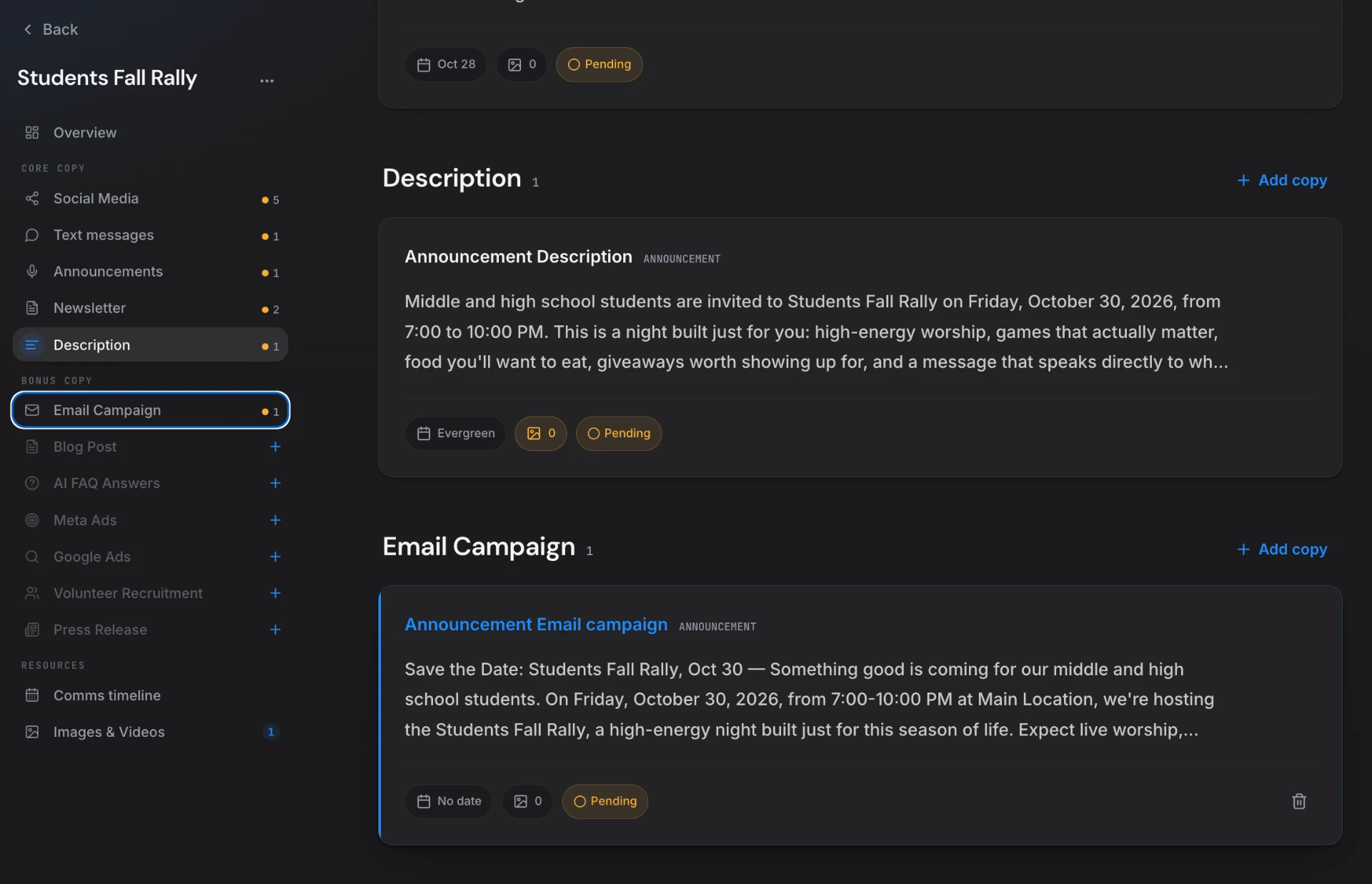
ChurchCopy is an AI church email writer. The AI Chat Assistant writes one-off emails in your church's tone, every copy package includes an email campaign written from your event prompt, and Add copy creates extra emails with a chosen angle — all governed by your church's AI policy and guardrails.
Church email takes too long and sounds inconsistent.
Every ministry writes its own emails, in its own style, usually at the last minute — and generic AI tools don't know your church.
Starting from a blank draft
Every event, change, or reminder means opening an empty email and figuring out what to say from scratch.
Every ministry sounds different
Kids, Students, and Outreach all write in their own voice, so your church doesn't sound like one church.
The same email, sent three times
The save-the-date, the reminder, and the last call end up as nearly identical messages people stop opening.
Generic AI isn't safe
Personal AI accounts don't know your beliefs or boundaries, so staff and volunteers have nothing keeping them on track.
Every church email, written safely in one place.
Whether it's a quick note or a full event campaign, ChurchCopy writes it in your voice and checks your AI policy first.
One-off emails in AI Chat
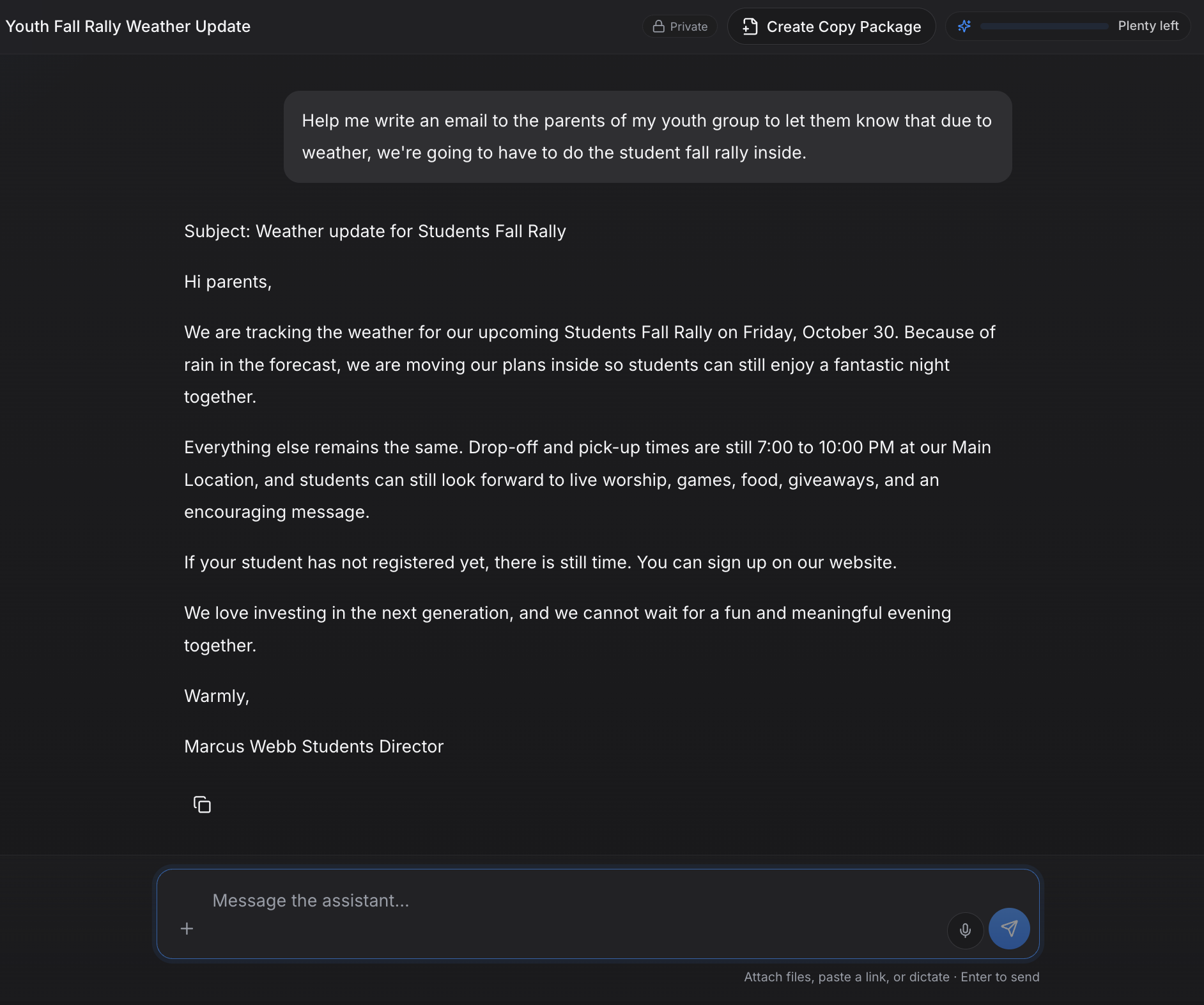
Ask for a weather update to parents, a volunteer thank-you, or a pastoral note. It's written in your church's tone with your mission and vision built in.
Email campaigns in every copy package
Describe your event once and ChurchCopy writes the email campaign right alongside your social posts, texts, and announcements.
Add copy with the angle you choose
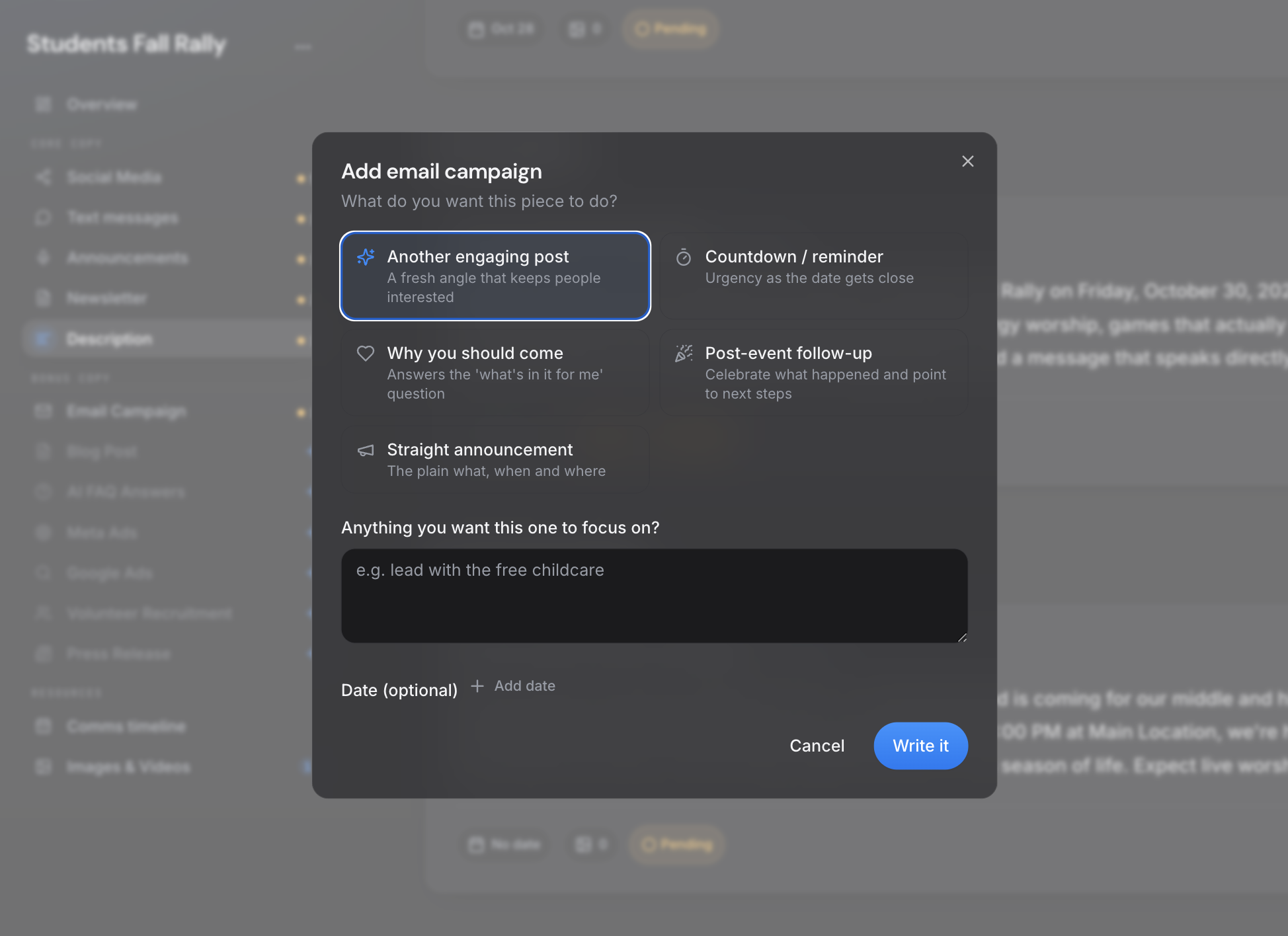
Click Add copy and pick another engaging email, a countdown reminder, why you should come, a post-event follow-up, or a straight announcement — plus your own focus.
Protected by your AI policy
Every email reviews your church settings, doctrinal boundaries, and restricted topics before it's written.
Paste into any email platform
Copy finished emails into Mailchimp, Constant Contact, Flocknote, Planning Center, or whatever you already use.
Four steps, start to sent.
Ask or create
Ask AI Chat for a one-off email, or create a copy package for your event.
Add the emails you need
Use Add copy for reminders, why-come emails, or follow-ups, each with its own focus.
Stay inside the guardrails
Every email is written within your church's settings and AI policy.
Copy and send
Edit or rephrase if you like, then paste into your email platform and mark it Used.
See it in ChurchCopy.
How teams actually use it.
Student Ministry
Send parents a clear, warm update the moment plans change.
Comms Director
Build a full save-the-date, reminder, and follow-up sequence from one event prompt.
Volunteers
Write emails confidently, knowing the AI policy is doing the checking.
Church Emails — common questions
Can AI write church emails in our church's voice?+
Yes. ChurchCopy uses your mission, vision, values, statement of faith, and tone of voice on every email, so you never have to train it or re-explain your church.
Can I write a quick one-off email without making a copy package?+
Yes. Ask the AI Chat Assistant for any email — a schedule change, a thank-you, a parent update — and it writes it right in the chat.
Can I make several different emails for the same event?+
Yes. In a copy package, click Add copy under Email Campaign and choose an angle — engaging, countdown reminder, why you should come, post-event follow-up, or straight announcement — plus an optional focus.
Is it safe for volunteers to write emails with ChurchCopy?+
Yes. Every email follows the AI policy, guardrails, and restricted topics your leadership sets, and nothing goes out until a person reviews it.
Does ChurchCopy send the emails for me?+
ChurchCopy writes and organizes your email copy. You paste it into the email platform you already use, like Mailchimp, Constant Contact, or Flocknote.
Explore more of the workspace
All featuresDashboard
A single command center showing this week's scheduled sends, pending approvals, open tasks, and active copy packages.
Learn moreAI Chat Assistant
A faith-aligned chat assistant grounded in your mission, voice, values, and AI policy — not a blank prompt box.
Learn moreCopy Packages
Describe an event once and build every core message, campaign asset, ad, recruitment piece, and send date as one organized package.
Learn moreReady to simplify your message?
Start free for 7 days. No credit card required.