Search
Type an event name, topic, or keyword to jump straight to it instead of scanning the month day by day.
Every message, on one calendar.
Your service planning tool shows the run of show. Your facilities calendar shows the rooms. Neither one shows what your church is saying, to whom, and when. The communications calendar does.
7-day free trial · No credit card required
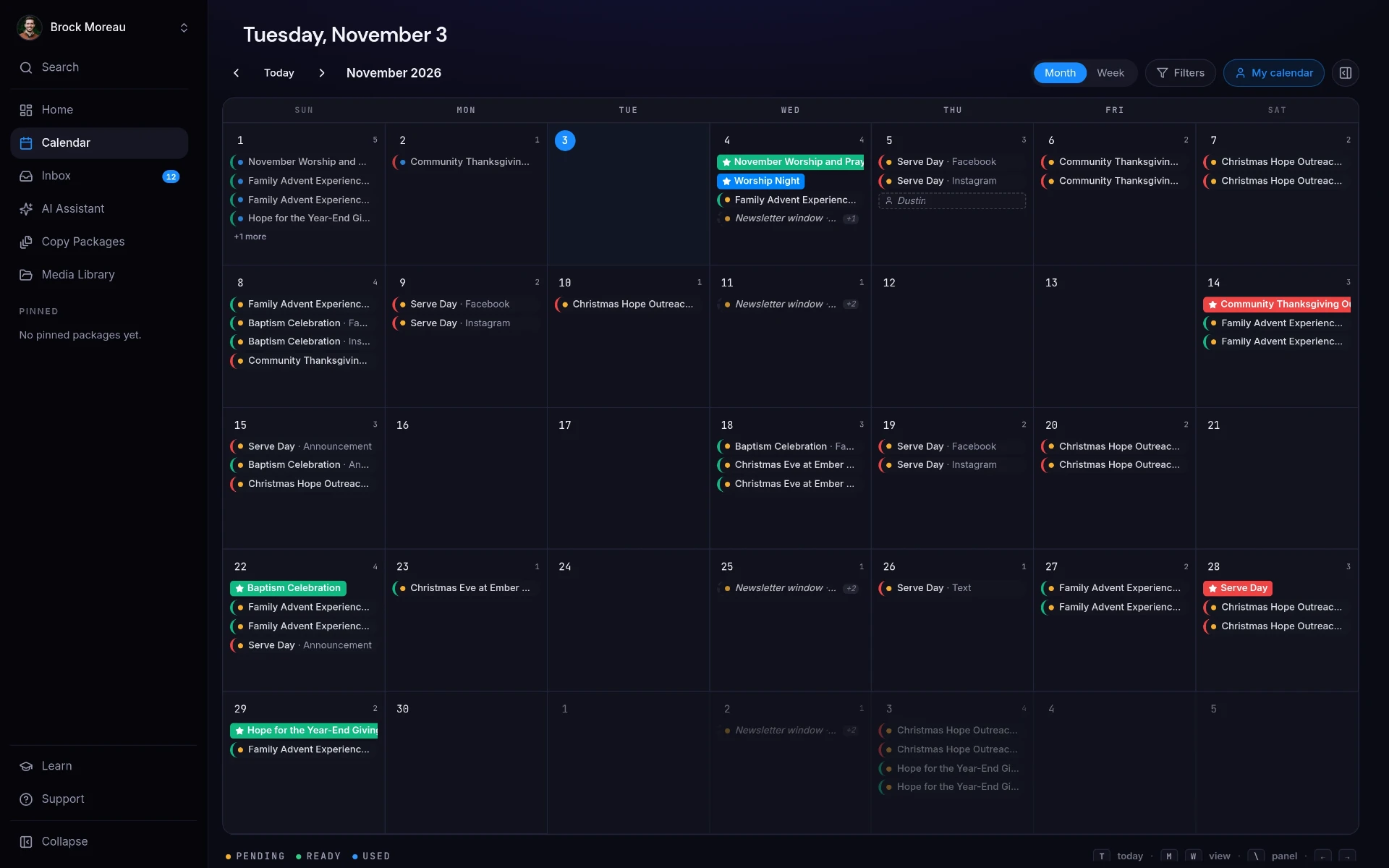
The ChurchCopy communications calendar shows every scheduled message (emails, texts, social posts, announcements, and newsletter windows) across all ministries in one month view.
Ministries plan independently, so the congregation gets three asks on the same Sunday and silence the next week.
Students, Kids, and Outreach all promote on the same weekend because none of them could see the others.
Whole stretches go by with nothing scheduled, and attendance for the next event suffers.
The comms calendar is a tab someone maintains by hand, which means it's out of date by Wednesday.
The event is Friday and the first email hasn't been written, because nothing surfaced it.
Copy packages automatically place their messages on the calendar, so the plan updates itself as your team works.
Every scheduled post, text, email, announcement, and newsletter window in one grid.
Narrow the month by ministry, status (pending, approved, or used), or element type, or search for a single item.
Nothing to maintain by hand. Generate a package and it appears on the calendar on the right dates.
See crowded weekends and empty weeks while there's still time to move something.
Ministry leaders can look at the calendar themselves instead of asking the comms director.
A full month across every ministry is a lot to look at. The filters panel lets each person pull up only the slice of the calendar they're responsible for.
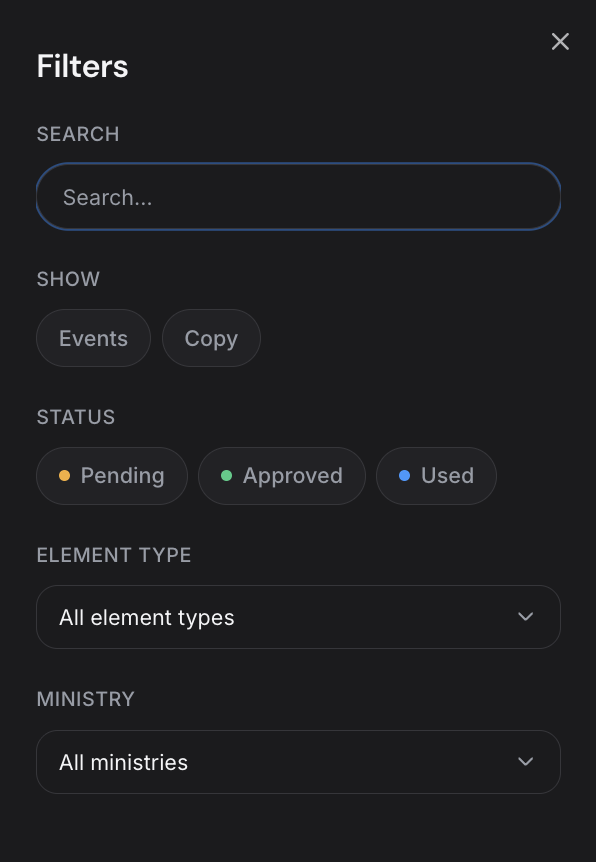
Type an event name, topic, or keyword to jump straight to it instead of scanning the month day by day.
Switch between the high-level event dates and the individual pieces of copy scheduled around them, or view both together.
Show only what's pending review, what's already approved, or what's been used, so nothing sits waiting without anyone noticing.
Filter by the kind of communication: social posts, text messages, stage announcements, emails, newsletters, and more.
Pull up one ministry's plan on its own (Kids, Students, Worship, Outreach) so leaders see their own work without the noise.
The same calendar works as a church-wide plan and as a personal to-do list, depending on how it's filtered.
Filter to pending items before the week starts and you can see every piece still waiting on a decision.
Each event's messages get dates when the package is generated.
See every ministry's communications side by side.
Rebalance crowded weekends and fill in the gaps before they happen.
Balance the month so no weekend carries three competing asks.
Time the sign-up push so it doesn't collide with the giving campaign.
See the whole church's messaging plan without a status meeting.
It's a shared calendar of every message your church is sending (emails, texts, social posts, stage announcements, and newsletters) across all ministries, so your team can plan the whole month instead of one event at a time.
No. Those plan services and spaces. ChurchCopy plans what you're communicating and when, which those tools don't cover.
No. When you generate a copy package, its messages are scheduled around the event date and show up on the calendar automatically.
Yes. Open the filters panel to search the calendar or narrow it by ministry, status (pending, approved, or used), and element type, or switch between events and copy. Each leader can view just their own ministry's plan.
Yes. Viewers are free and unlimited, so every ministry leader can see the plan.
A clean home screen: pick an event, Sunday's sermon, or a quick message and start writing, with every package you're working on right below.
Learn moreA faith-aligned chat assistant grounded in your mission, voice, values, and AI policy, not a blank prompt box.
Learn moreDescribe an event once and build every core message, campaign asset, ad, recruitment piece, and send date as one organized package.
Learn moreStart free for 7 days. No credit card required.